

A Quick Step-By-Step Guide on How to Use ChatGPT
In an era where artificial intelligence transforms daily interactions, understanding tools like ChatGPT not only enhances productivity but also bridges the gap between complex technology and everyday users. If you’ve recently stumbled upon ChatGPT and are curious about maximizing its potential, this article will explore how to use it in simple steps.
What Is ChatGPT?
ChatGPT stands for Chat-based Generative Pre-trained Transformer. Developed by OpenAI, this AI-driven tool is revolutionizing the way we interact with machines. Imagine having a conversation with a system that understands and responds with almost human-like accuracy. That’s ChatGPT for you—designed to handle a wide range of queries with responses that are not only immediate but surprisingly insightful.

Frimufilms | Freepik | ChatGPT was developed by OpenAI and is revolutionizing the way we interact with machines.
The backbone of ChatGPT is its advanced natural language processing capabilities. Through extensive training and reinforcement learning from human feedback, it has learned to refine its conversational abilities. Whether you’re a student looking for quick summaries, a professional drafting emails, or a developer needing coding help, ChatGPT can assist you swiftly and efficiently.
How to Use ChatGPT in 6 Steps
1. Setting Up Your Account
The first step to accessing ChatGPT is simple. Head over to the OpenAI website and either log in with your existing account or sign up if you’re new to the platform. Signing up is straightforward—follow the prompts to enter your email, create a password, and verify your details. Remember, the basic service is free, but you can always upgrade for more advanced features.
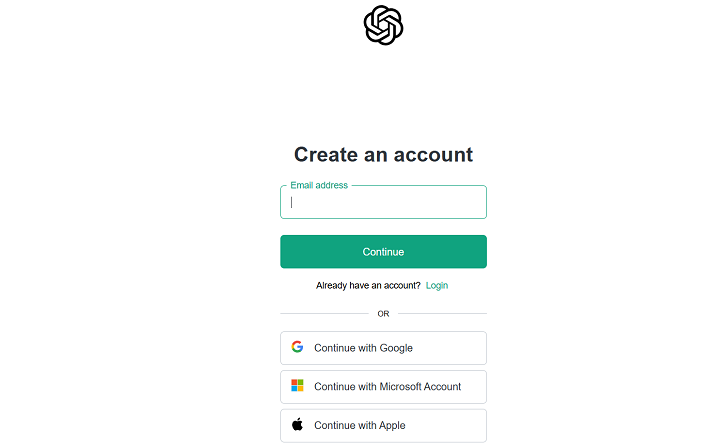
Front Story | To set up a ChatGPT account, visit the OpenAI website and either log in with your existing account or sign up if you’re new to the platform.
2. Starting a Conversation
Once you’re logged in, initiating a conversation with ChatGPT is as easy as typing a message. Navigate to the ChatGPT interface, find the message box, and type your query or command. Hit enter, and within seconds, ChatGPT will spring into action, offering responses crafted to address your specific needs.
3. Fine-Tuning Your Interactions
ChatGPT is adept at handling a variety of tasks, but getting the most out of it sometimes requires fine-tuning your prompts. This could mean rephrasing questions for clarity or specifying the context more directly. If the response isn’t quite what you expected, adjust your prompt and try again. This iterative process helps in honing the accuracy of the responses you receive.
4. Exploring Advanced Features
For those with a Plus subscription, ChatGPT offers the ability to browse the internet, pulling in the most current data to answer your questions. This feature enhances the tool’s utility, especially when you need up-to-date information. Moreover, you can personalize your interaction by asking ChatGPT to remember certain details for future conversations, streamlining your experience.

Jonathan Kemper | Unsplash | ChatGPT Plus subscription offers the ability to browse the internet, pulling in the most current data to answer your questions.
5. Utilizing the Output
What do you do with the information once ChatGPT provides it? Whether it’s a crafted email, a code snippet, or a well-argued point, you can directly copy this from the interface and paste it wherever needed. Additionally, the platform offers options to like, dislike, or share responses, which helps in refining the model and your future interactions.
6. Managing and Customizing
An interesting aspect of ChatGPT is its customizable nature. If you find yourself frequently discussing specific topics, you can set preferences that guide how ChatGPT handles your conversations. This can be particularly useful for professionals who need consistency in tone and style.
While ChatGPT is a robust tool, it’s not infallible. It operates within the boundaries of its programming and the information it was trained on. Hence, while it’s an excellent aid, always use it as an augmentative tool rather than a sole source for information or decision-making.
More in Tech
-
`
 Rihanna’s Net Worth Drops After Failed Luxury Brand Collaboration
Rihanna has always been a trendsetter, but not every business move hits the mark. The pop icon reportedly faced a major...
November 4, 2025 -
`
 Maine Travel Guide | Safe Coastal Towns, Beaches & Fresh Seafood
When the leaves start to turn and the summer crowds fade, travelers begin looking for quieter escapes—places where the scenery speaks...
October 28, 2025 -
`
 Are Tech Billionaires’ Doomsday Plans a Sign of Something Bigger?
The idea of tech billionaires preparing for the end of the world sounds like something straight out of ‘Don’t Look Up’....
October 21, 2025 -
`
 Taylor Swift Delivers Bold Statement on Cancel Culture Through Music
Taylor Swift never shies away from turning controversy into art. With her latest song “Cancelled!” from her twelfth studio album “The...
October 15, 2025 -
`
 Sean Combs Mentored Inmates in Jail, Teaching Them to Think Like a Mogul
Sean “Diddy” Combs spent part of his recent time in jail teaching fellow inmates about business, entrepreneurship, and personal development. The...
October 7, 2025 -
`
 Why Istanbul Is the New Celebrity Hotspot for Style and Wellness
Celebrities are constantly reinventing themselves—sometimes through a new sound, other times through a striking new look. But the latest wave of...
October 1, 2025 -
`
 Is Apple Ditching the SIM Card With Its Latest iPhone?
For years, sliding a tiny SIM card into a phone has been the first step to getting connected. Apple now appears...
September 23, 2025 -
`
 Why New York Nightlife Keeps Attracting Visitors Worldwide
New York comes alive after dark in a way few places on earth can match. The city never limits itself to...
September 16, 2025 -
`
 How Celebrities Are Taking Over the Business World
The definition of celebrity success has expanded well past awards and sold-out tours. Today, many Hollywood names are equally focused on...
September 9, 2025
More From Todaysnyc
-
 What Is Workplace Culture? Understanding Its Meaning & Importance
“Workplace culture” is a term frequently seen in job postings, company websites, and professional conversations. Despite its prevalence, it’s often misunderstood...
CultureApril 1, 2026 -
 Why Surging Oil Prices Won’t Spark a U.S. Inflation Nightmare
Rising oil prices have rattled financial markets and raised fresh concerns about inflation across the United States. Since the start of...
BusinessMarch 25, 2026 -
 This 112-Acre Florida Island Inspired Jimmy Buffett’s ‘Cheeseburger in Paradise’
Off the southwest coast of Florida sits a small island that feels refreshingly untouched by modern development. Cabbage Key may be...
Luxury & Life StyleMarch 16, 2026 -
 The Group Chat Rules Nobody Talks About (But You Should Follow)
Group chats have quietly reshaped daily communication. Plans for dinner, updates about a child’s birthday, collaboration on a work project, and...
TechMarch 9, 2026 -
 How the Bay Area Skate Culture Started
For those who grew up in the 1980s, Friday nights often meant the roller rink: dimmed lights, pulsing music, and skaters...
CultureMarch 5, 2026
You must be logged in to post a comment Login